https://blog.bitsrc.io/10-quick-typescript-one-liners-128a2721345
Showing posts with label Typescript. Show all posts
Showing posts with label Typescript. Show all posts
Sunday, February 27, 2022

Wednesday, January 12, 2022
TS-Node: Typescript execute engine
In my previous article, I have described how to create a simple typescript nodejs project. The method works fine in a small project, but take longer compilation time on a large project because its need to compile all typescript files on every change.
Create Node.js & Express.js with Typescript Project
The solution is using ts-node where it direct run the typescript without compiling it to javascript.
- Follow the steps to create a Node.js & Express.js with Typescript.
- Type "npm install -g ts-node".
- Add an entry to package.json."scripts": {"test": "echo \"Error: no test specified\" && exit 1","build": "tsc -b","start": "node dist/app.js","dev": "nodemon dist/app.js","dev:ts": "nodemon --exec ts-node src/app.ts"},
- Now you can just run the development using 1 console: npm run dev:ts
Thursday, April 22, 2021
Create Node.js & Express.js with Typescript Project
- Create a folder.
- Type command "npm init" to create package files.
- Type "npm install -g typescript" to install typescript.
- Type "tsc --init" to create typescript config file.
- Type "npm install express --save" to download express module.
- Type "npm install nodemon --save-dev" to download nodemon developer tool.
- Type "install install @types/node --save-dev" to download typescript node definition files.
- Type "install install @types/express --save-dev" to download typescript express definition files.
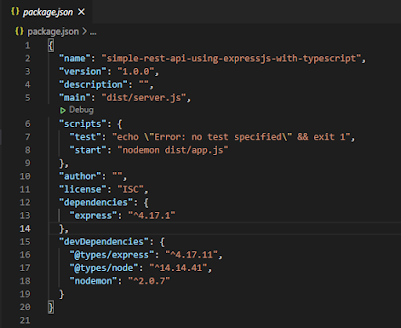
- Edit the package.json
- Change to main to "dist/app.js" to point to the start javascript file.
- Add the start scripts, "start" : "nodemon dist/app.js"
- The package.json will look like below:
- Edit the tsconfig.json
- Add "moduleResolution" : "node" under "module" : "commonjs".
- Change the "outDir" : "./dist". This is the location where typescript compiles the javascript.
- Change the "rootDir" : "./srv". This is where we store the typescript files.
- The tsconfig.json will look like below:

- Create /src folder and add app.ts. Edit the app.ts with the below script.import express from "express";const app = express();const port = process.env.port || 3001;// Adding middleway to use syntax req.body.name.app.use(express.json());app.get("/", (req, res) => res.send("Hello World!"));app.listen(port, () =>console.log(`Example app is listening on post ${port}!`));
- Open a terminal run "npm start". This will start the web server using nodemon.
- Open another terminal run "tsc --watch". This will watch the /src folder to compile the ts to javascript.
- Call http://localhost:3001/ using postman. If you see "Hello World!", congratulation, you have completed the setup Node.js & Express.js with the Typescript project.

Below is the project you may download from GitHub.
Below GitHub is the example of the Node.js & Express.js project. You may compare the different of project setup.
Friday, April 16, 2021
Typescript: Shorthand Initialization
In a lot of use cases, the fields are initialized in the constructor.
class Person {
// Fields declaration
name : string;
private id : string;
// Initial the field value in constructor
constructor(name : string, id : string) {
this.name = name;
this.id = id;
}
}
You can simplify to
class Person {
constructor(private name : string, public id : string) {}
}
Typescript: Singleton
Singleton is a design pattern that ensures that only one objects exits.
/**
* The Singleton class defines the `getInstance` method that lets clients access
* the unique singleton instance.
*/
class ExampleSingleton {
private static instance: ExampleSingleton;
/**
* The Singleton's constructor should always be private to prevent direct
* construction calls with the `new` operator.
*/
private constructor() { }
/**
* The static method that controls the access to the singleton instance.
*
* This implementation let you subclass the Singleton class while keeping
* just one instance of each subclass around.
*/
public static getInstance(): ExampleSingleton {
if (!ExampleSingleton.instance) {
ExampleSingleton.instance = new ExampleSingleton();
}
return ExampleSingleton.instance;
}
/**
* Finally, any singleton should define some business logic, which can be
* executed on its instance.
*/
public someBusinessLogic() {
// ...
}
}
/**
* The client code.
*/
function clientCode() {
const s1 = ExampleSingleton.getInstance();
const s2 = ExampleSingleton.getInstance();
if (s1 === s2) {
console.log('Singleton works, both variables contain the same instance.');
} else {
console.log('Singleton failed, variables contain different instances.');
}
}
clientCode();
Singleton used case can be logging class where we can re-use the object.
Subscribe to:
Posts (Atom)